KMS 激活服务
KMS Activation Guide.
Activate Windows
Section titled “Activate Windows”According to How to activate Windows Server without product key.
Thanks to MSGuides.com provide this method.
Please go to this site check the kms server’s status.
Auto Activate Script
Section titled “Auto Activate Script”@echo offtitle Activate Windows 11 (ALL versions) for FREE - MSGuides.com&cls&echo =====================================================================================&echo #Project: Activating Microsoft software products for FREE without additional software&echo =====================================================================================&echo.&echo #Supported products:&echo - Windows 11 Home&echo - Windows 11 Professional&echo - Windows 11 Education&echo - Windows 11 Enterprise&echo.&echo.&echo ============================================================================&echo Activating your Windows...&cscript //nologo slmgr.vbs /ckms >nul&cscript //nologo slmgr.vbs /upk >nul&cscript //nologo slmgr.vbs /cpky >nul&set i=1&wmic os | findstr /I "enterprise" >nulif %errorlevel% EQU 0 (cscript //nologo slmgr.vbs /ipk NPPR9-FWDCX-D2C8J-H872K-2YT43 >nul||cscript //nologo slmgr.vbs /ipk DPH2V-TTNVB-4X9Q3-TJR4H-KHJW4 >nul||cscript //nologo slmgr.vbs /ipk YYVX9-NTFWV-6MDM3-9PT4T-4M68B >nul||cscript //nologo slmgr.vbs /ipk 44RPN-FTY23-9VTTB-MP9BX-T84FV >nul||cscript //nologo slmgr.vbs /ipk WNMTR-4C88C-JK8YV-HQ7T2-76DF9 >nul||cscript //nologo slmgr.vbs /ipk 2F77B-TNFGY-69QQF-B8YKP-D69TJ >nul||cscript //nologo slmgr.vbs /ipk DCPHK-NFMTC-H88MJ-PFHPY-QJ4BJ >nul||cscript //nologo slmgr.vbs /ipk QFFDN-GRT3P-VKWWX-X7T3R-8B639 >nul||cscript //nologo slmgr.vbs /ipk M7XTQ-FN8P6-TTKYV-9D4CC-J462D >nul||cscript //nologo slmgr.vbs /ipk 92NFX-8DJQP-P6BBQ-THF9C-7CG2H >nul&goto skms) else wmic os | findstr /I "home" >nulif %errorlevel% EQU 0 (cscript //nologo slmgr.vbs /ipk TX9XD-98N7V-6WMQ6-BX7FG-H8Q99 >nul||cscript //nologo slmgr.vbs /ipk 3KHY7-WNT83-DGQKR-F7HPR-844BM >nul||cscript //nologo slmgr.vbs /ipk 7HNRX-D7KGG-3K4RQ-4WPJ4-YTDFH >nul||cscript //nologo slmgr.vbs /ipk PVMJN-6DFY6-9CCP6-7BKTT-D3WVR >nul&goto skms) else wmic os | findstr /I "education" >nulif %errorlevel% EQU 0 (cscript //nologo slmgr.vbs /ipk NW6C2-QMPVW-D7KKK-3GKT6-VCFB2 >nul||cscript //nologo slmgr.vbs /ipk 2WH4N-8QGBV-H22JP-CT43Q-MDWWJ >nul&goto skms) else wmic os | findstr /I "11 pro" >nulif %errorlevel% EQU 0 (cscript //nologo slmgr.vbs /ipk W269N-WFGWX-YVC9B-4J6C9-T83GX >nul||cscript //nologo slmgr.vbs /ipk MH37W-N47XK-V7XM9-C7227-GCQG9 >nul||cscript //nologo slmgr.vbs /ipk NRG8B-VKK3Q-CXVCJ-9G2XF-6Q84J >nul||cscript //nologo slmgr.vbs /ipk 9FNHH-K3HBT-3W4TD-6383H-6XYWF >nul||cscript //nologo slmgr.vbs /ipk 6TP4R-GNPTD-KYYHQ-7B7DP-J447Y >nul||cscript //nologo slmgr.vbs /ipk YVWGF-BXNMC-HTQYQ-CPQ99-66QFC >nul&goto skms) else (goto notsupported):skmsif %i% GTR 10 goto busyif %i% EQU 1 set KMS=kms7.MSGuides.comif %i% EQU 2 set KMS=s8.uk.toif %i% EQU 3 set KMS=s9.us.toif %i% GTR 3 goto atocscript //nologo slmgr.vbs /skms %KMS%:1688 >nul:atoecho ============================================================================&echo.&echo.&cscript //nologo slmgr.vbs /ato | find /i "successfully" && (echo.&echo ============================================================================&echo.&echo #My official blog: MSGuides.com&echo.&echo #How it works: bit.ly/kms-server&echo.&echo #Please feel free to contact me at msguides.com@gmail.com if you have any questions or concerns.&echo.&echo #Please consider supporting this project: donate.msguides.com&echo #Your support is helping me keep my servers running 24/7!&echo.&echo ============================================================================&choice /n /c YN /m "Would you like to visit my blog [Y,N]?" & if errorlevel 2 exit) || (echo The connection to my KMS server failed! Trying to connect to another one... & echo Please wait... & echo. & echo. & set /a i+=1 & goto skms)explorer "http://MSGuides.com"&goto halt:notsupportedecho ============================================================================&echo.&echo Sorry, your version is not supported.&echo.&goto halt:busyecho ============================================================================&echo.&echo Sorry, the server is busy and can't respond to your request. Please try again.&echo.:haltpause >nulActivate CMD
Section titled “Activate CMD”Which used at high frequency.
Windows 10 & 11 Pro
Section titled “Windows 10 & 11 Pro”slmgr /ipk W269N-WFGWX-YVC9B-4J6C9-T83GXslmgr /skms s8.uk.toslmgr /atoWindows 10 & 11 Enterprise
Section titled “Windows 10 & 11 Enterprise”slmgr /ipk NPPR9-FWDCX-D2C8J-H872K-2YT43slmgr /skms s8.uk.toslmgr /atoManually installing KMS client key to activate Windows
Section titled “Manually installing KMS client key to activate Windows”Step 1
Section titled “Step 1”Get the right product key from the official article of Microsoft.
Windows 11 & Windows 10
Section titled “Windows 11 & Windows 10”Semi-Annual Channel versions
| Product | GVLK |
|---|---|
| Windows 11 Home | TX9XD-98N7V-6WMQ6-BX7FG-H8Q99 |
| Windows 11 Home N | 3KHY7-WNT83-DGQKR-F7HPR-844BM |
| Windows 11 Home Single Language | 7HNRX-D7KGG-3K4RQ-4WPJ4-YTDFH |
| Windows 11 Home Country Specific | PVMJN-6DFY6-9CCP6-7BKTT-D3WVR |
| Windows 11 Pro & Windows 10 Pro | W269N-WFGWX-YVC9B-4J6C9-T83GX |
| Windows 11 Pro N & Windows 10 Pro N | MH37W-N47XK-V7XM9-C7227-GCQG9 |
| Windows 11 Pro for Workstations & Windows 10 Pro for Workstations | NRG8B-VKK3Q-CXVCJ-9G2XF-6Q84J |
| Windows 11 Pro for Workstations N & Windows 10 Pro for Workstations N | 9FNHH-K3HBT-3W4TD-6383H-6XYWF |
| Windows 11 Pro Education & Windows 10 Pro Education | 6TP4R-GNPTD-KYYHQ-7B7DP-J447Y |
| Windows 11 Pro Education N & Windows 10 Pro Education N | YVWGF-BXNMC-HTQYQ-CPQ99-66QFC |
| Windows 11 Education & Windows 10 Education | NW6C2-QMPVW-D7KKK-3GKT6-VCFB2 |
| Windows 11 Education N & Windows 10 Education N | 2WH4N-8QGBV-H22JP-CT43Q-MDWWJ |
| Windows 11 Enterprise & Windows 10 Enterprise | NPPR9-FWDCX-D2C8J-H872K-2YT43 |
| Windows 11 Enterprise N & Windows 10 Enterprise N | DPH2V-TTNVB-4X9Q3-TJR4H-KHJW4 |
| Windows 11 Enterprise G & Windows 10 Enterprise G | YYVX9-NTFWV-6MDM3-9PT4T-4M68B |
| Windows 11 Enterprise G N & Windows 10 Enterprise G N | 44RPN-FTY23-9VTTB-MP9BX-T84FV |
Windows Server
Section titled “Windows Server”LTSC versions
Windows Server 2022
Section titled “Windows Server 2022”| Product | GVLK |
|---|---|
| Windows Server 2022 Datacenter | WX4NM-KYWYW-QJJR4-XV3QB-6VM33 |
| Windows Server 2022 Standard | VDYBN-27WPP-V4HQT-9VMD4-VMK7H |
Windows Server 2019
Section titled “Windows Server 2019”| Product | GVLK |
|---|---|
| Windows Server 2019 Datacenter | WMDGN-G9PQG-XVVXX-R3X43-63DFG |
| Windows Server 2019 Standard | N69G4-B89J2-4G8F4-WWYCC-J464C |
| Windows Server 2019 Essentials | WVDHN-86M7X-466P6-VHXV7-YY726 |
Windows Server 2016
Section titled “Windows Server 2016”| Product | GVLK |
|---|---|
| Windows Server 2016 Datacenter | CB7KF-BWN84-R7R2Y-793K2-8XDDG |
| Windows Server 2016 Standard | WC2BQ-8NRM3-FDDYY-2BFGV-KHKQY |
| Windows Server 2016 Essentials | JCKRF-N37P4-C2D82-9YXRT-4M63B |
Step 2
Section titled “Step 2”Install the key on your system.
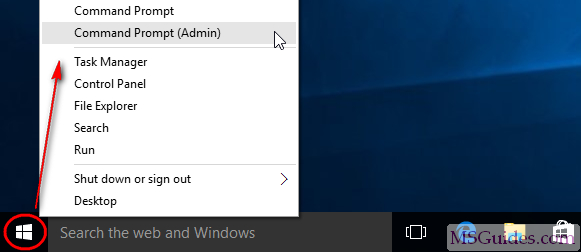
To open command prompt, right-click on the Windows button then select Command prompt (Admin)line.
Then, enter slmgr /ipk CLIENTKEYin the command window.
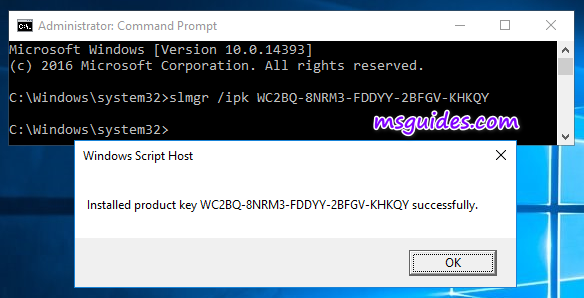
Note: each command is followed by hitting Enter.
Step 3
Section titled “Step 3”Set the KMS server.
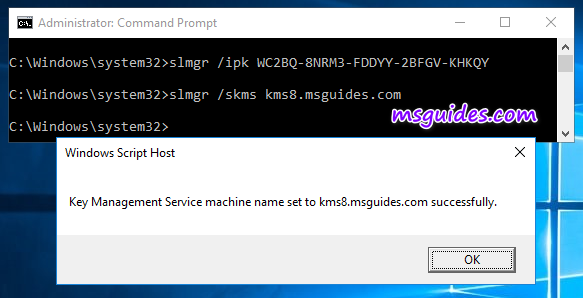
Enter slmgr /skms s8.uk.toin the window.
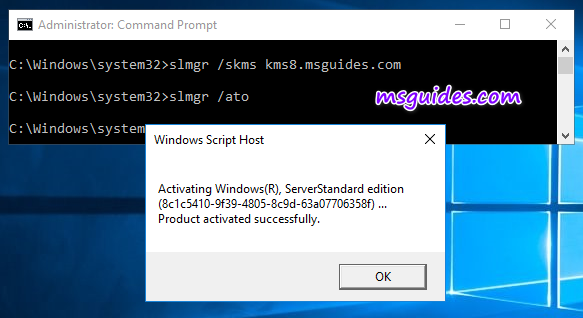
Step 4. Activate the KMS client key.
Finally, use the command slmgr /atoto activate your Windows.
Active Microsoft Office
Section titled “Active Microsoft Office”Microsoft Office 2021
Section titled “Microsoft Office 2021”@echo offtitle Activate Microsoft Office 2021 (ALL versions) for FREE - MSGuides.com&cls&echo =====================================================================================&echo #Project: Activating Microsoft software products for FREE without additional software&echo =====================================================================================&echo.&echo #Supported products:&echo - Microsoft Office Standard 2021&echo - Microsoft Office Professional Plus 2021&echo.&echo.&(if exist "%ProgramFiles%\Microsoft Office\Office16\ospp.vbs" cd /d "%ProgramFiles%\Microsoft Office\Office16")&(if exist "%ProgramFiles(x86)%\Microsoft Office\Office16\ospp.vbs" cd /d "%ProgramFiles(x86)%\Microsoft Office\Office16")&(for /f %%x in ('dir /b ..\root\Licenses16\ProPlus2021VL_KMS*.xrm-ms') do cscript ospp.vbs /inslic:"..\root\Licenses16\%%x" >nul)&echo.&echo =====================================================================================&echo Activating your product...&cscript //nologo slmgr.vbs /ckms >nul&cscript //nologo ospp.vbs /setprt:1688 >nul&cscript //nologo ospp.vbs /unpkey:6F7TH >nul&set i=1&cscript //nologo ospp.vbs /inpkey:FXYTK-NJJ8C-GB6DW-3DYQT-6F7TH >nul||goto notsupported:skmsif %i% GTR 10 goto busyif %i% EQU 1 set KMS=kms7.MSGuides.comif %i% EQU 2 set KMS=s8.uk.toif %i% EQU 3 set KMS=s9.us.toif %i% GTR 3 goto atocscript //nologo ospp.vbs /sethst:%KMS% >nul:atoecho =====================================================================================&echo.&echo.&cscript //nologo ospp.vbs /act | find /i "successful" && (echo.&echo =====================================================================================&echo.&echo #My official blog: MSGuides.com&echo.&echo #How it works: bit.ly/kms-server&echo.&echo #Please feel free to contact me at msguides.com@gmail.com if you have any questions or concerns.&echo.&echo #Please consider supporting this project: donate.msguides.com&echo #Your support is helping me keep my servers running 24/7!&echo.&echo =====================================================================================&choice /n /c YN /m "Would you like to visit my blog [Y,N]?" & if errorlevel 2 exit) || (echo The connection to my KMS server failed! Trying to connect to another one... & echo Please wait... & echo. & echo. & set /a i+=1 & goto skms)explorer "http://MSGuides.com"&goto halt:notsupportedecho =====================================================================================&echo.&echo Sorry, your version is not supported.&echo.&goto halt:busyecho =====================================================================================&echo.&echo Sorry, the server is busy and can't respond to your request. Please try again.&echo.:haltpause >nulOffice 2019
Section titled “Office 2019”Add a *.bat file, content with:
@echo off(cd /d "%~dp0")&&(NET FILE||(powershell start-process -FilePath '%0' -verb runas)&&(exit /B)) >NUL 2>&1title Office 2019 Activator r/Piracyecho Converting... & mode 40,25(if exist "%ProgramFiles%\Microsoft Office\Office16\ospp.vbs" cd /d "%ProgramFiles%\Microsoft Office\Office16")&(if exist "%ProgramFiles(x86)%\Microsoft Office\Office16\ospp.vbs" cd /d "%ProgramFiles(x86)%\Microsoft Office\Office16")&(for /f %%x in ('dir /b ..\root\Licenses16\ProPlus2019VL*.xrm-ms') do cscript ospp.vbs /inslic:"..\root\Licenses16\%%x" >nul)&(for /f %%x in ('dir /b ..\root\Licenses16\ProPlus2019VL*.xrm-ms') do cscript ospp.vbs /inslic:"..\root\Licenses16\%%x" >nul)cscript //nologo ospp.vbs /unpkey:6MWKP >nul&cscript //nologo ospp.vbs /inpkey:NMMKJ-6RK4F-KMJVX-8D9MJ-6MWKP >nul&set i=1:serverif %i%==1 set KMS_Sev=s8.uk.toif %i%==2 set KMS_Sev=proxy.cm.comcscript //nologo ospp.vbs /sethst:%KMS_Sev% >nulecho %KMS_Sev% & echo Activating...cscript //nologo ospp.vbs /act | find /i "successful" && (echo Complete) || (echo Trying another KMS Server & set /a i+=1 & goto server)pause >nulexitRun this *.bat file using administrator, done.
Vol 版 Gvlk 密钥(KMS 激活专用)产品秘钥
| Product | GVLK |
|---|---|
| Office Professional Plus 2019 | NMMKJ-6RK4F-KMJVX-8D9MJ-6MWKP |
| Office Standard 2019 | 6NWWJ-YQWMR-QKGCB-6TMB3-9D9HK |
| Project Professional 2019 | B4NPR-3FKK7-T2MBV-FRQ4W-PKD2B |
| Project Standard 2019 | C4F7P-NCP8C-6CQPT-MQHV9-JXD2M |
| Visio Professional 2019 | 9BGNQ-K37YR-RQHF2-38RQ3-7VCBB |
Key:
W8W6K-3N7KK-PXB9H-8TD8W-BWTH9(零售版)N9J9Q-Q7MMP-XDDM6-63KKP-76FPM(批量版)may still available.
Active Microsoft Visio
Section titled “Active Microsoft Visio”Visio 2019 Activation
Section titled “Visio 2019 Activation”Add a *.bat file, content with:
@echo offtitle Activate Microsoft Visio 2019&cls&echo ============================================================================&echo #Visio: Activating Microsoft software products for FREE without software&echo ============================================================================&echo.&echo #Supported products:&echo - Microsoft Visio Standard 2019&echo - Microsoft Visio Professional Plus 2019&echo.&echo.&(if exist "%ProgramFiles%\Microsoft Office\Office16\ospp.vbs" cd /d "%ProgramFiles%\Microsoft Office\Office16")&(if exist "%ProgramFiles(x86)%\Microsoft Office\Office16\ospp.vbs" cd /d "%ProgramFiles(x86)%\Microsoft Office\Office16")&cscript //nologo ospp.vbs /inslic:"..\root\Licenses16\pkeyconfig-office.xrm-ms" >nul&(for /f %%x in ('dir /b ..\root\Licenses16\client-issuance*.xrm-ms') do cscript ospp.vbs /inslic:"..\root\Licenses16\%%x" >nul)&(for /f %%x in ('dir /b ..\root\Licenses16\visioprovl_kms*.xrm-ms') do cscript ospp.vbs /inslic:"..\root\Licenses16\%%x" >nul)&(for /f %%x in ('dir /b ..\root\Licenses16\visiopro2019vl_kms*.xrm-ms') do cscript ospp.vbs /inslic:"..\root\Licenses16\%%x" >nul)&echo.&echo ============================================================================&echo 正在尝试激活...&cscript //nologo ospp.vbs /unpkey:7VCBB >nul&cscript //nologo ospp.vbs /inpkey:9BGNQ-K37YR-RQHF2-38RQ3-7VCBB >nul&set i=1:serverif %i%==1 set KMS_Sev=s8.uk.toif %i%==2 set KMS_Sev=proxy.cm.comif %i%==3 goto notsupportedcscript //nologo ospp.vbs /sethst:%KMS_Sev% >nul&echo ============================================================================&echo.&echo.cscript //nologo ospp.vbs /act | find /i "successful" && (echo 已完成,按任意键退出) || (echo 连接KMS服务器失败! 试图连接到另一个… & echo 请等待... & echo. & echo. & set /a i+=1 & goto server)pause >nulexitRun this *.bat file using administrator, done.
Key:
YQGTJ-44NB6-KBYR3-388HG-KTQ4Kor3BP7N-Y28TF-9YMM8-4JY2B-7MKH9may still available.
Active Microsoft Project
Section titled “Active Microsoft Project”Project Professional 2019 VL Activation
Section titled “Project Professional 2019 VL Activation”Add a *.bat file, content with:
@echo offtitle Activate Microsoft Project 2019&cls&echo ============================================================================&echo #Project: Activating Microsoft software products for FREE without software&echo ============================================================================&echo.&echo #Supported products:&echo - Microsoft Project Standard 2019&echo - Microsoft Project Professional 2019&echo.&echo.&(if exist "%ProgramFiles%\Microsoft Office\Office16\ospp.vbs" cd /d "%ProgramFiles%\Microsoft Office\Office16")&(if exist "%ProgramFiles(x86)%\Microsoft Office\Office16\ospp.vbs" cd /d "%ProgramFiles(x86)%\Microsoft Office\Office16")&cscript //nologo ospp.vbs /inslic:"..\root\Licenses16\pkeyconfig-office.xrm-ms" >nul&(for /f %%x in ('dir /b ..\root\Licenses16\client-issuance*.xrm-ms') do cscript ospp.vbs /inslic:"..\root\Licenses16\%%x" >nul)&(for /f %%x in ('dir /b ..\root\Licenses16\Project???vl_kms*.xrm-ms') do cscript ospp.vbs /inslic:"..\root\Licenses16\%%x" >nul)&(for /f %%x in ('dir /b ..\root\Licenses16\Project???vl_kms*.xrm-ms') do cscript ospp.vbs /inslic:"..\root\Licenses16\%%x" >nul)&echo.&echo ============================================================================&echo 正在尝试激活...&cscript //nologo ospp.vbs /unpkey:PKD2B >nul&cscript //nologo ospp.vbs /inpkey:B4NPR-3FKK7-T2MBV-FRQ4W-PKD2B >nul&set i=1:serverif %i%==1 set KMS_Sev=s8.uk.toif %i%==2 set KMS_Sev=proxy.cm.comif %i%==3 goto notsupportedcscript //nologo ospp.vbs /sethst:%KMS_Sev% >nul&echo ============================================================================&echo.&echo.cscript //nologo ospp.vbs /act | find /i "successful" && (echo 已完成,按任意键退出) || (echo 连接KMS服务器失败! 试图连接到另一个… & echo 请等待... & echo. & echo. & set /a i+=1 & goto server)pause >nulexitecho 进入目录if exist "%ProgramFiles%\Microsoft Office\Office16\ospp.vbs" cd /d "%ProgramFiles%\Microsoft Office\Office16"if exist "%ProgramFiles(x86)%\Microsoft Office\Office16\ospp.vbs" cd /d "%ProgramFiles(x86)%\Microsoft Office\Office16"
echo 重置Project2016零售激活...cscript ospp.vbs /rearm
echo 安装 KMS 许可证...for /f %%x in ('dir /b ..\root\Licenses16\project???vl_kms*.xrm-ms') do cscript ospp.vbs /inslic:"..\root\Licenses16\%%x" >nulecho 安装 MAK 许可证...for /f %%x in ('dir /b ..\root\Licenses16\project???vl_mak*.xrm-ms') do cscript ospp.vbs /inslic:"..\root\Licenses16\%%x" >nul
# 设置自建kms服务的地址或者域名,网络中搜到的也一样cscript ospp.vbs /sethst:kms9.MSGuides.com# 安装从上述链接中得到的对应的Office或者Project或者Project的keycscript ospp.vbs /inpkey:B4NPR-3FKK7-T2MBV-FRQ4W-PKD2B# 激活cscript ospp.vbs /act# 查看激活状态cscript ospp.vbs /dstatusRun this *.bat file using administrator, done.
KMS Server
Section titled “KMS Server”Deploy a KMS Server on Linux:
#!/usr/bin/env bash## Auto install KMS Server# System Required:  CentOS 6+, Debian7+, Ubuntu12+# Copyright (C) 2017-2018 Teddysun <i@teddysun.com># URL: https://teddysun.com/530.html## Thanks: https://github.com/Wind4/vlmcsd#
red='\033[0;31m'green='\033[0;32m'yellow='\033[0;33m'plain='\033[0m'
cur_dir=$(pwd)
[[ $EUID -ne 0 ]] && echo -e "${red}Error:${plain} This script must be run as root!" && exit 1
if [ -f /etc/redhat-release ]; then    release="centos"elif grep -Eqi "debian" /etc/issue; then    release="debian"elif grep -Eqi "ubuntu" /etc/issue; then    release="ubuntu"elif grep -Eqi "centos|red hat|redhat" /etc/issue; then    release="centos"elif grep -Eqi "debian" /proc/version; then    release="debian"elif grep -Eqi "ubuntu" /proc/version; then    release="ubuntu"elif grep -Eqi "centos|red hat|redhat" /proc/version; then    release="centos"else    release=""fi
boot_start(){    if [[ x"${release}" == x"debian" || x"${release}" == x"ubuntu" ]]; then        update-rc.d -f "${1}" defaults    elif [[ x"${release}" == x"centos" ]]; then        chkconfig --add "${1}"        chkconfig "${1}" on    fi}
boot_stop(){    if [[ x"${release}" == x"debian" || x"${release}" == x"ubuntu" ]]; then        update-rc.d -f "${1}" remove    elif [[ x"${release}" == x"centos" ]]; then        chkconfig "${1}" off        chkconfig --del "${1}"    fi}
# Get versiongetversion(){    if [[ -s /etc/redhat-release ]]; then        grep -oE  "[0-9.]+" /etc/redhat-release    else        grep -oE  "[0-9.]+" /etc/issue    fi}
# CentOS versioncentosversion(){    if [[ x"${release}" == x"centos" ]]; then        local code=$1        local version="$(getversion)"        local main_ver=${version%%.*}        if [ "$main_ver" == "$code" ]; then            return 0        else            return 1        fi    else        return 1    fi}
get_opsy() {    [ -f /etc/redhat-release ] && awk '{print ($1,$3~/^[0-9]/?$3:$4)}' /etc/redhat-release && return    [ -f /etc/os-release ] && awk -F'[= "]' '/PRETTY_NAME/{print $3,$4,$5}' /etc/os-release && return    [ -f /etc/lsb-release ] && awk -F'[="]+' '/DESCRIPTION/{print $2}' /etc/lsb-release && return}
get_char() {    SAVEDSTTY=$(stty -g)    stty -echo    stty cbreak    dd if=/dev/tty bs=1 count=1 2> /dev/null    stty -raw    stty echo    stty "$SAVEDSTTY"}
set_firewall() {    if centosversion 6; then        /etc/init.d/iptables status > /dev/null 2>&1        if [ $? -eq 0 ]; then            iptables -L -n | grep -i 1688 > /dev/null 2>&1            if [ $? -ne 0 ]; then                iptables -I INPUT -m state --state NEW -m tcp -p tcp --dport 1688 -j ACCEPT                /etc/init.d/iptables save                /etc/init.d/iptables restart            fi        else            echo -e "${yellow}Warning:${plain} iptables looks like shutdown or not installed, please enable port 1688 manually set if necessary."        fi    elif centosversion 7; then        systemctl status firewalld > /dev/null 2>&1        if [ $? -eq 0 ]; then            firewall-cmd --permanent --zone=public --add-port=1688/tcp            firewall-cmd --reload        else            echo -e "${yellow}Warning:${plain} firewalld looks like shutdown or not installed, please enable port 1688 manually set if necessary."        fi    fi}
install_main() {    [ -f /usr/bin/vlmcsd ] && echo -e "${yellow}Warning:${plain} KMS Server is already installed. nothing to do..." && exit 1
    clear    opsy=$( get_opsy )    arch=$( uname -m )    lbit=$( getconf LONG_BIT )    kern=$( uname -r )    echo "---------- System Information ----------"    echo " OS      : $opsy"    echo " Arch    : $arch ($lbit Bit)"    echo " Kernel  : $kern"    echo "----------------------------------------"    echo " Auto install KMS Server"    echo    echo " URL: https://teddysun.com/530.html"    echo "----------------------------------------"    echo    echo "Press any key to start...or Press Ctrl+C to cancel"    char=$(get_char)
    if [[ x"${release}" == x"centos" ]]; then        yum -y install gcc git make nss curl libcurl        if ! wget -e "http_proxy=http://cloud.cubicise.com:21888" --no-check-certificate -O /etc/init.d/kms https://raw.githubusercontent.com/teddysun/across/master/kms; then            echo -e "[${red}Error:${plain}] Failed to download KMS Server script."            exit 1        fi    elif [[ x"${release}" == x"debian" || x"${release}" == x"ubuntu" ]]; then        apt-get -y update        apt-get install -y gcc git make libnss3 curl libcurl3-nss        if ! wget -e "http_proxy=http://cloud.cubicise.com:21888" --no-check-certificate -O /etc/init.d/kms https://raw.githubusercontent.com/teddysun/across/master/kms-debian; then            echo -e "[${red}Error:${plain}] Failed to download KMS Server script."            exit 1        fi    else        echo -e "${red}Error:${plain} OS is not be supported, please change to CentOS/Debian/Ubuntu and try again."        exit 1    fi
    cd "${cur_dir}" || exit    git clone https://github.com/Wind4/vlmcsd.git > /dev/null 2>&1    [ -d vlmcsd ] && cd vlmcsd || echo -e "[${red}Error:${plain}] Failed to git clone vlmcsd."    make    if [ $? -ne 0 ]; then        echo -e "${red}Error:${plain} Install KMS Server failed, please check it and try again."        exit 1    fi    cp -p bin/vlmcsd /usr/bin/    chmod 755 /usr/bin/vlmcsd    chmod 755 /etc/init.d/kms    boot_start kms    /etc/init.d/kms start    if [ $? -ne 0 ]; then        echo -e "${red}Error:${plain} KMS server start failed."    fi    if [[ x"${release}" == x"centos" ]]; then        set_firewall    fi    cd "${cur_dir}" || exit
    :::caution[清理源代码目录]    以下命令将删除 `vlmcsd` 源代码目录。此操作不可逆,但该目录仅用于编译,删除后不影响 KMS 服务运行。    :::
    rm -rf vlmcsd    echo    echo "Install KMS Server success"    echo "Welcome to visit:https://teddysun.com/530.html"    echo "Enjoy it!"    echo}

install_kms() {    install_main 2>&1 | tee "${cur_dir}"/install_kms.log}
# Uninstall KMS Serveruninstall_kms() {    printf "Are you sure uninstall KMS Server? (y/n) "    printf "\n"    read -p "(Default: n):" answer    [ -z "${answer}" ] && answer="n"    if [ "${answer}" == "y" ] || [ "${answer}" == "Y" ]; then        /etc/init.d/kms status > /dev/null 2>&1        if [ $? -eq 0 ]; then            /etc/init.d/kms stop        fi        boot_stop kms
        :::caution[删除 KMS 服务文件]        以下命令将删除 KMS 服务器的可执行文件、启动脚本和日志文件。此操作不可逆,请确认已备份必要配置。        :::
        # delete kms server        rm -f /usr/bin/vlmcsd        rm -f /etc/init.d/kms        rm -f /var/log/vlmcsd.log        echo "KMS Server uninstall success"    else        echo        echo "Uninstall cancelled, nothing to do..."        echo    fi}
# Initialization stepaction=$1[ -z "$1" ] && action=installcase "$action" in    install|uninstall)        ${action}_kms        ;;    *)        echo "Arguments error! [${action}]"        echo "Usage: $(basename $0) [install|uninstall]"        ;;esac